Lifesight & Roku

Automatically ingest Roku impressions, spend, and attributed revenue into Lifesight, centralizing Connected TV performance within your unified measurement environment.

Evaluate Roku performance alongside other marketing channels using Causal Attribution, Incrementality Testing, and Marketing Mix Modeling.

Reduce manual reporting and reconciliation by bringing Connected TV data into the Lifesight Unified Measurement OS for a single source of truth.

How to connect Roku to Lifesight

  1. Go to the Connect module in Lifesight, select Integrations, and search for Roku.
  2. Click Connect and sign in to your Roku Ads Manager account to begin the authorization process.
  3. Grant Lifesight permission by assigning the required Roku account access and roles, then approve the connection.
  4. Once authorized, Roku data such as impressions, spend, and attributed revenue will automatically sync into Lifesight for unified measurement and reporting.
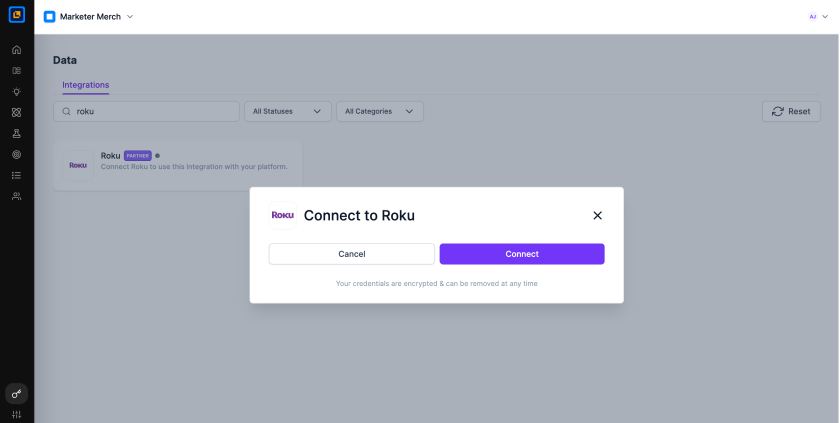
Roku Step Image

Explore Our Wide Range of Integrations

Easily connect your ad channels, tools, and platforms to centralize data for advanced measurement, optimization, and actionable insights.